How to optimize PDF files so LLMs can process them


In short
A short guide to PDF optimization for language models: why scans and images block extraction, how to use tagged PDF, XMP metadata, Word/Markdown styles, and attach CSV/JSON and plain text to improve indexing and AI response accuracy.
Why traditional PDFs are a "black hole" for language models
A PDF without a semantic layer - built from screenshots, tables rendered as images, and text drawn as graphic shapes rather than actual characters - is largely invisible to a language model, even if it looks impeccable to the human eye.
This is not a marginal problem. Companies store critical operational knowledge in whitepapers, quarterly reports, and commercial proposals. When these documents enter AI-powered internal search systems or tools in the RAG (Retrieval-Augmented Generation - models that supplement text generation by searching external knowledge bases) class, the quality of answers is directly proportional to the quality of text extraction. A document that a parser reads as a string of disconnected fragments - or, in the worst case, as an empty block - drops out of the knowledge base entirely.
The paradox is that the more elaborate and visually refined a document is, the higher the risk of parsing errors. Complex column layouts, decorative backgrounds, non-standard fonts, and tables converted to graphics look professional in print, but for text extraction mechanisms they represent a series of obstacles.
Anatomy of parsing errors: where AI stumbles
The most common failures have specific, repeatable causes.
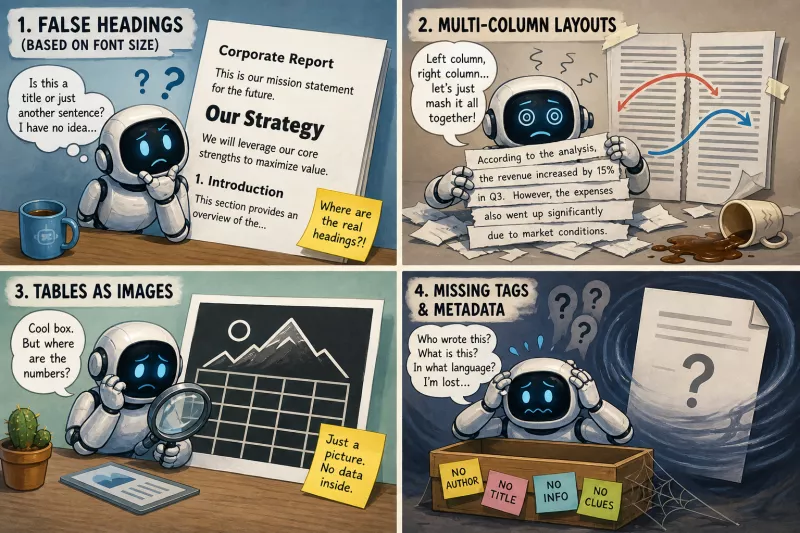
False headings based on font size. In a document that has no structure tags, the parser has no way of knowing that bold text at 18 points is a chapter title. It sees it as just another sentence, semantically identical to paragraph body text. The document hierarchy - H1, H2, H3 - disappears. The language model then works on a flat wall of text with no way to distinguish a section heading from a sentence inside a paragraph.
Multi-column layouts. PDF scanners read pages sequentially or heuristically, depending on the implementation. Text from the left column may get fused with the first sentence of the right column from the middle of the page, producing a meaningless string. Two-column reports, common in product presentations and marketing materials, are particularly susceptible to this type of error.
Tables as images. A table pasted in as a screenshot, or generated by a design tool as a vector object without a text layer, gives the parser nothing but an empty rectangle or a sequence of characters with no row-and-column structure. Financial data, product comparisons, KPI (Key Performance Indicators) summaries - all of it will evaporate from the knowledge base if the table does not exist as real text.
Missing tags and metadata. A file without structure tags and without populated XMP (Extensible Metadata Platform - the standard for document description) metadata fields arrives at the parser as an anonymous collection of text lines. The absence of author, title, language, or keyword information makes it harder to classify the document before content scanning even begins.
All of these errors converge into one effect: the model returns answers that are uncertain, incomplete, or - in the case of numerical data - wrong. Not because the model is poor. Because the document gave it nothing solid to build on.
A paradigm shift: Markdown and HTML as the hard source of truth
The short answer: a Markdown file, a Word document with paragraph styles, or a static HTML page should be treated as the primary document file - and LLM-optimized PDF means ensuring that the presentation format does not destroy the structure that already exists in the source.
In the traditional workflow, PDF is the final product: a designer opens a template, pastes in text, exports the file, and that exported version is what gets archived and distributed. In a machine-friendly approach, PDF becomes purely a presentation format - the equivalent of a clean printout for the human reader. The hard source of truth remains the Markdown file, the Word document with properly applied paragraph styles, or the static HTML page.
This distinction has serious operational consequences. A Markdown file can be converted to HTML, a tagged PDF can be generated from HTML, and every content update happens in one place and propagates from there. If a quarterly report requires changing a single number, the editor modifies the source - rather than hunting for where that sentence sits inside the PDF file.
From a text extraction perspective: a Markdown file or well-structured HTML contains heading hierarchy, lists, tables, and metadata as native building blocks. The parser does not have to guess what is a title. It knows from the tag.
How to adapt company templates to LLM requirements
Modifying templates does not require abandoning visual identity. It only requires placing that identity in the right location. Below is a before-and-after example for a typical corporate report template:
Before. Chapter title: text manually bolded, 20 pt size, brand-compliant color, entered directly as a plain paragraph. Parsing result: the parser reads this fragment as another sentence in continuous text. Chapter hierarchy is invisible.
After. The same text, same font, same color - but applied to the "Heading 2" (H2) paragraph style in Word, or as the ## Chapter title tag in Markdown. Parsing result: the model immediately recognizes the section boundary, can build a document map, and routes queries to the correct fragment.
The change is cosmetic to the eye and fundamental to the machine.
A few concrete recommendations for teams using Word or InDesign tools:
-
Use only native paragraph styles (Heading 1, Heading 2, Normal, Quote) - never manual formatting as substitutes.
-
Embed custom fonts at export or use standard encodings (Unicode), avoiding proprietary typefaces rendered as images without a text layer.
-
Eliminate decorative image backgrounds behind text - they interfere with OCR (Optical Character Recognition) and reduce parsing contrast.
-
Prefer single-column layout for text sections; if a two-column layout is required by the brand, use clearly defined text areas with a preserved reading order.
Authoring and design principles for machine-friendly documents
Preparing a document for AI readability starts at the writing stage, not at export.
A logical heading tree. The H1 → H2 → H3 hierarchy must reflect the actual content structure of the document. One H1 per document (the main title). Chapters as H2. Subsections as H3. Levels should not be skipped, and headings should not be created purely for visual effect.
Real text tables instead of images. Every data table should exist as a native text table in the source document. Design tools (Canva, Adobe InDesign) tempt with the ability to paste a beautifully formatted data summary as a graphic - that is a dead end for parsing. If data must look a particular way, a graphic version can be included alongside, but a text-based table must exist in parallel.
Descriptive alt attributes for images. Charts, infographics, and diagrams should have descriptive alt text that explains what the graphic shows, not just what the file is called. "Bar chart comparing revenue in Q1-Q4 2024: 18% year-over-year growth" is useful. "Chart.png" provides no information.
Single-column operational layout. For documents intended for reliable AI processing, a single-column layout eliminates the risk of text sequencing errors on read. For reports that must retain a two-column layout for human readers, a separate single-column file as a machine supplement is worth considering.
Page numbering and section markers. Consistent numbering and headers/footers containing the document title and section number make it easier for language models to parse and cite specific fragments.
Correct document export: tagged PDF with a semantic layer
Tagged PDF is the only export format that carries the structure of the source document into the presentation file without destroying it - and it is precisely this that forms the foundation of accurate text extraction by AI tools and RAG systems.
The export phase is the moment at which all the prior work can be undone by a single bad decision.
The most serious mistake is using the "Print to PDF" option available in the operating system or printer driver. This method creates a vector file without any semantic structure - all the tags, styles, and heading hierarchy correctly built in the source document disappear. The file looks identical, but it is semantically dead.
The required standard is a semantic layer in PDF, which only Tagged PDF provides. Tagged PDF is a format that preserves embedded XML structure - including markers for titles, paragraphs, lists, and tables - as well as a readable text layer separated from the visual layer. The parser receives both the text and information about what that text is.
How to produce Tagged PDF in common tools:
- Microsoft Word: File → Export → Create PDF/XPS → in the options dialog, check "Document structure tags for accessibility" (PDF/UA or PDF/A-1a compatibility, depending on the version).
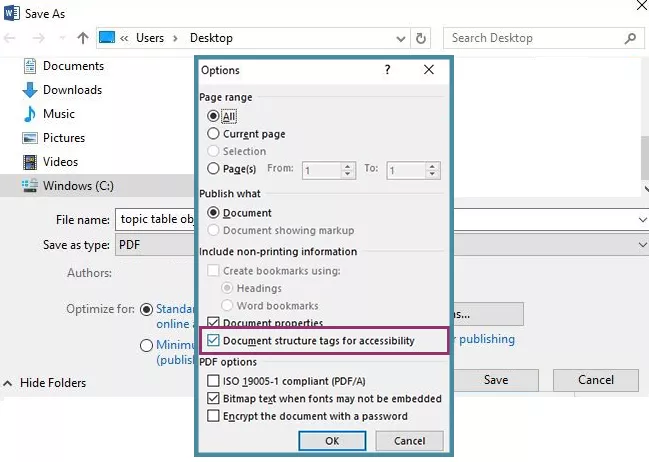
-
Adobe InDesign: Export → Adobe PDF (Print) → Advanced tab → check "Create tagged document".
-
Google Docs: Export to .docx format, then convert via Word or tools that support Tagged PDF - direct PDF export from Docs does not preserve the full tag structure.
Additional export settings that matter for parsing:
-
Embed all fonts so that text is not rendered as curves.
-
Do not flatten layers or apply compression that merges text with graphics.
-
Disable optimizations that reduce file size at the cost of the text layer.
Interactive table of contents and XMP fields as navigational signposts
A clickable TOC (Table of Contents) is not merely a navigational convenience for the reader. For the PDF parser it is a ready-made priority map - a list of the document's most important sections with anchored links to specific pages. Models using extraction tools can use this map to selectively retrieve fragments rather than processing the entire document linearly.
XMP metadata fields should be populated before export:
-
Title - the full, descriptive name of the document.
-
Author - the person or organization responsible for the content.
-
Subject/Description - one or two sentences describing the content.
-
Keywords - 5-10 terms key to the document's subject matter.
-
Language - language code (pl, en), relevant for parsing in multilingual environments.
A parser that receives this data before beginning content scanning has a classification context. Documents without metadata enter the knowledge base as anonymous fragments - findable, but harder to cite accurately.
Machine supplements: a rescue for complex data sets
Even a perfectly optimized Tagged PDF has limits. Financial tables with dozens of columns, multi-layered comparison matrices, or charts with granular data series - these are classes of content where the PDF format, regardless of its quality, remains suboptimal for the machine.
The solution is the report package standard: alongside the main PDF file, the same data is distributed in raw formats. CSV (Comma-Separated Values) files for numerical tables, JSON (JavaScript Object Notation - a lightweight data interchange format) or XML for data with complex hierarchy. These files are parsed by models without the risk of sequencing errors or loss of row-and-column structure.
The benefit is bidirectional. The machine receives data in a format native to processing, without needing to interpret a visual layout. At the same time, the risk of model hallucination is reduced - the situation in which an LLM guesses the value of a number it could not correctly read from a table-as-image.
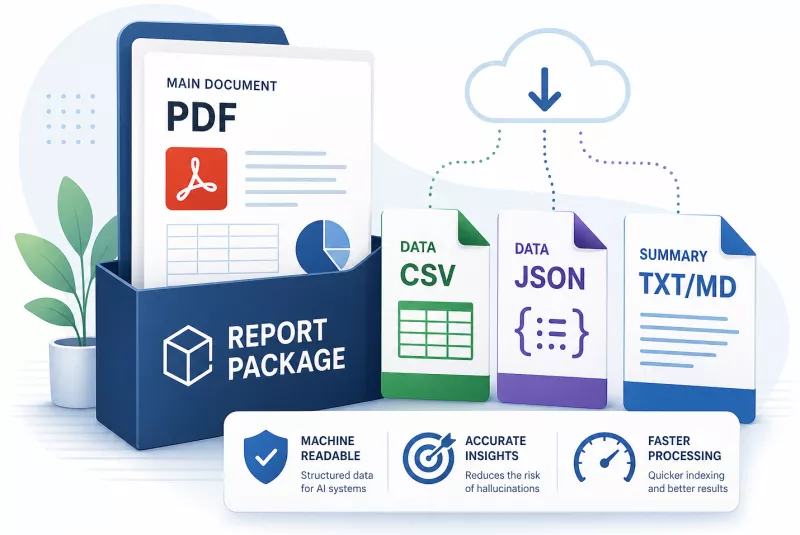
Implementation does not require any change to the main document's design. It is enough to attach CSV and JSON files to each report as part of the official download package or as attachments in an internal knowledge management system.
Plain text as a fast lane for bots
Alongside raw numerical data, one more supplement is worth preparing: a summary in plain text format - a .txt or .md file without formatting, containing the document's key arguments, figures, and conclusions.
In RAG systems, this file serves as a fast lane. A bot searching for an answer about quarterly results does not need to process the entire PDF document. It reaches for the summary, which contains condensed knowledge in a directly digestible format. Automatic summaries generated by such systems are more accurate, and indexing time is shorter.
This practice makes particular sense for long documents - annual reports, extensive whitepapers, multi-page proposals. A short, structured plain-text version alongside the main PDF is a low implementation cost for a meaningful gain in extraction quality.
The recommended minimum set for every report distributed in an environment where AI tools are in use:
-
Primary file: tagged PDF with XMP metadata and a clickable TOC.
-
Tabular data: CSV or JSON file corresponding to the tables in the report.
-
Summary: plain text in .txt or .md format.
The impact of optimization on the knowledge base: summary and first steps
Each of the steps described above solves a specific part of the information black hole problem.
A structured source (Markdown, Word with styles, HTML) guarantees that the document hierarchy exists before anything is exported. Tagged PDF carries that structure into the presentation format without destroying it. XMP metadata and a clickable table of contents give parsers a classification context and a navigational map. Machine supplements - CSV, JSON, plain text - eliminate the last class of errors: those arising from the natural limitations of the PDF format with complex data.
The cumulative effect is measurable. Documents that are correctly constructed semantically enter the knowledge base complete, rather than as fragments cut off mid-sentence. AI search returns more accurate answers because the model can precisely cite a section instead of reconstructing it from scraps. Automatic summaries generated in RAG systems more accurately reflect the content of the original. Brand visibility in language model responses - a metric measurable in analytics platforms such as BrandinAI - increases when the cited documents are reliable sources rather than collections of interpreted guesswork.
The optimal first step does not require rebuilding the entire document archive. It is enough to select one key document - a report, whitepaper, or proposal - and run a simple parsability test: drop the PDF into any language model (such as ChatGPT, Claude, or Gemini) and check whether the model correctly interprets the data it contains - whether it can answer precisely about specific numbers, section names, or document structure. If the answers are accurate and consistent with the original, the document is ready for machine processing. If the model confuses data, skips sections, or produces inconsistent answers, that identifies exactly where to begin. Adding plain text and a CSV file with key data to that document, and implementing the full optimization cycle on that one representative example, is the right place to start.