Quick GEO optimizations for websites - priority changes with the highest impact


Key takeaways
-
GEO (Generative Engine Optimization) is the practice of organizing content and metadata on a website so that bots collecting data for language models can accurately identify who runs the business, what it sells, and how to contact it.
-
Simple, structured content (unambiguous product descriptions, consistent NAP, FAQ sections) is processed by crawlers faster and with less risk of error than decorative marketing language.
-
A correctly filled JSON-LD tag of type
OrganizationandProductallows a model to link a website to official brand data without having to infer it from page content. -
Contact details embedded in graphics are invisible to a bot - only plain text or HTML guarantees they will be read and correctly attributed to the brand.
-
Discrepancies in a company name, email address, or business hours across subpages lower brand credibility in the eyes of algorithms that treat factual consistency as a reliability signal.
-
Technical barriers - blocked access in
robots.txt, a missing or outdatedsitemap.xml, indexing errors - prevent bots from reaching optimized content, negating the effect of all other work. -
A 0/7/30-day verification cycle after implementing changes, supplemented by an audit every 30-90 days, is the minimum required to maintain accurate brand representation in generative results.
What GEO is and how it affects a site's visibility in AI
GEO (Generative Engine Optimization) is the process of organizing a website's content and metadata so that language models - which power generative search engines and AI assistants - can unambiguously identify a brand, understand its offering, and cite accurate information. A well-optimized site increases the likelihood of correct brand representation in generative responses; a disorganized site exposes a brand to misinterpretation or being skipped altogether.
It helps to think of a bot as a virtual archivist. It arrives at an enormous warehouse full of boxes - websites - and must instantly decide where to put each one. If a box has a clear label showing the name, contents, and expiry date, the archivist places it on the right shelf immediately. If the label is printed in a decorative font, full of metaphors and data-free marketing slogans, the box ends up in the "needs clarification" pile - or is ignored entirely.
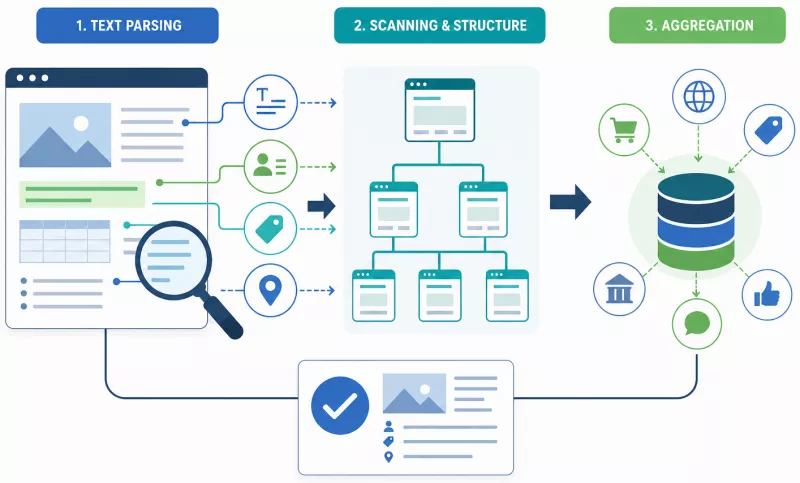
Crawlers and data-aggregating bots operate in three sequential stages:
- Text parsing - analyzes the content of paragraphs, tables, lists, and Schema tags, extracting concrete facts: names, prices, contact details, product specifications.
- Structure scanning - the bot reads the heading hierarchy (H1-H3), navigation, and internal links to understand the site's architecture.
- Aggregation - combines the gathered information with data from other sources (social media, industry directories) and builds a coherent picture of the brand.
At each of these stages, simple, unambiguous content shortens processing time and reduces the risk of error. That is precisely why a short, specific product description outperforms poetic narrative, and a well-filled JSON-LD block outperforms the most beautifully formatted paragraph text.
Contact details and the "About us" section: a business card for artificial intelligence
Contact details should be placed exclusively as plain text or HTML tags. A uniform, readable format is the basic trust signal for content-processing algorithms. A bot verifying company information behaves like a courier trying to deliver a parcel - if the homepage shows one email address, the footer shows another, and Google Business Profile shows a third, the courier does not know where to go. The parcel is returned to sender. For a bot, this translates to an inconsistent or unresolved brand profile.
Embedding a phone number, email address, or business hours in a graphic or image means those details simply do not exist as far as a crawler is concerned.
Two useful format variants for NAP (Name, Address, Phone):
Short variant (e.g. site footer):
Company Name | +48 123 456 789 | contact@company.comFull variant ("Contact" or "About us" subpage):
<address>
  <strong>Company Name Ltd.</strong>
  12 Example Street, 00-001 Warsaw
  Tel.: <a href="tel:+48123456789">+48 123 456 789</a>
  E-mail: <a href="mailto:contact@company.com">contact@company.com</a>
  Business hours: Mon–Fri 9:00–17:00
</address>
Business hours deserve particular attention - outdated entries (such as old holiday hours) can appear in generative responses and mislead potential customers.
Credibility (E-E-A-T)
E-E-A-T signals (Experience, Expertise, Authoritativeness, Trustworthiness) are built in part through factual consistency across different points on the web. Language models assess source credibility partly by checking whether a company name, email address, and phone number are identical on the website, in social profiles, and in external directories. Every discrepancy - a typo in the name, a differently formatted phone number - lowers that score.
The "About us" page should contain: the company's full legal name, the year it was founded, a brief plain-language description of its activities, contact details in text form, and the full names or titles of the people responsible for the company, where applicable. None of this information should be placed exclusively in graphics or images - those elements are transparent to a crawler.
Product descriptions, FAQ, and TL;DR: cutting through marketing noise
A bot does not appreciate poetry. It is looking for answers to specific questions: what is this, what is it for, what are its specifications, how much does it cost. If a product description opens with "A revolutionary solution transforming the face of the industry," the model has to guess what is actually being sold - and that guess is frequently wrong.
A simple product description template:
[Name] | [What it does - one sentence] | [Key technical feature] | [Price]Three examples of the transition from marketing copy to useful specifications:
Example 1 - whole-bean coffee:
Before: "Discover the magic of morning in every cup of our exceptional, artisanally roasted coffee."
After:
- Whole-bean coffee, Arabica Ethiopia Yirgacheffe
- Light roast; notes of berries and citrus
- Grind: suitable for drip or Chemex brewing
- Weight: 250 g | Price: $14.99
Example 2 - wireless headphones:
Before: "Feel the music as if you were on stage - no compromises, no cables, no limits."
After:
- Wireless headphones BT-500 Pro
- Bluetooth 5.3 connectivity; range up to 15 m
- Battery life: 30 h (ANC mode on: 22 h)
- Price: $109 | SKU: BT500PRO-BLK
Example 3 - online course:
Before: "A transformational journey into the world of data that will reshape your career forever."
After:
- Course: Data Analysis in Python - beginner level
- Duration: 12 hours of video + practical assignments
- Requirements: basic Excel proficiency
- Price: $89 | Access: lifetime
Two elements worth adding to every product or service make it easier for machines to retrieve definitions instantly:
TL;DR (Too Long; Didn't Read) is a one-sentence product subtitle placed directly beneath the product name. Example: "Lightweight wireless headphones with a 30-hour battery and active noise cancellation, designed for remote work." A model can quote this sentence directly - without needing to interpret a paragraph.
FAQ (Frequently Asked Questions), in a question-and-answer format, allows a bot to retrieve a ready-made definition rather than reconstruct it from running text. Example:
Q: Do the BT-500 Pro headphones work with iOS devices? A: Yes, the headphones work with any device supporting Bluetooth 5.3, including iPhone and iPad.
Both elements - TL;DR and FAQ - reduce the risk of so-called AI hallucinations: situations in which a model provides non-existent specifications or prices because it could not find them directly in the content.
How to implement JSON-LD for a company and its products
JSON-LD (JavaScript Object Notation for Linked Data) is the fastest way to pass key brand facts to a bot without relying on the model correctly interpreting the page content. Instead of asking the courier to open every parcel to check its contents, a clear label with all the necessary information is pasted on the outside. The automated sorting facility reads the label and routes the parcel onwards in seconds.
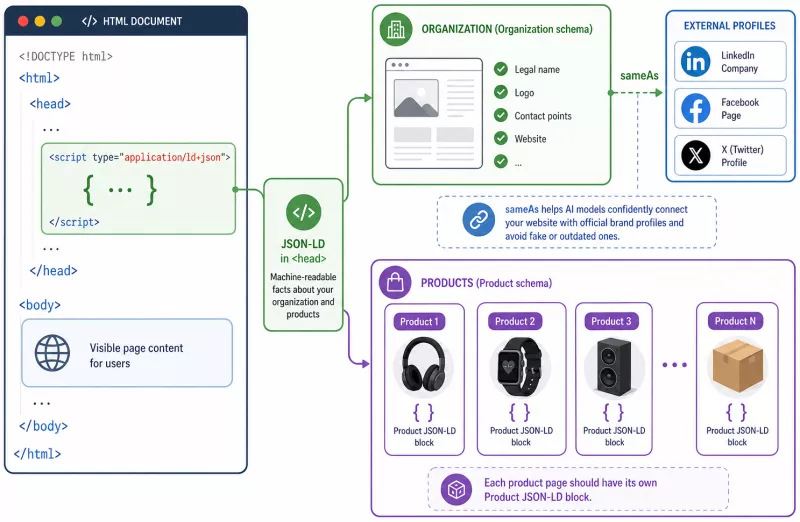
A JSON-LD tag is placed inside the <head> tag of the page, in a <script type="application/ld+json"> section. This requires no modification to visible content and no advanced programming knowledge - it is enough to copy and fill in the templates below.
Organization: anchoring brand identity
The Organization schema links a website to its official identity - its legal name, logo, contact details, and social media profiles. This means the model does not have to guess whether "Company X" on the site is the same "Company X" as on LinkedIn.
<script type="application/ld+json">
{
  "@context": "https://schema.org",
  "@type": "Organization",
  "name": "Company Name Ltd.",
  "description": "Brief description of the company's activities - one or two sentences.",
  "url": "https://www.company.com",
  "logo": "https://www.company.com/logo.png",
  "contactPoint": {
    "@type": "ContactPoint",
    "telephone": "+1-800-123-4567",
    "email": "contact@company.com",
    "contactType": "customer service"
  },
  "sameAs": [
    "https://www.linkedin.com/company/company-name",
    "https://www.facebook.com/companyName"
  ]
}
</script>
The sameAs field is particularly important - it is precisely what allows a model to reliably link the website to the brand's official channels and rule out false or outdated profiles.
Product: eliminating errors in prices and specifications
The Product schema supplies the bot with precise data about a specific product or service. Generative snippets (fragments of responses generated by AI models) often cite incorrect prices or specifications when they cannot find that information in an unambiguous form - explicitly providing these values in JSON-LD makes parsing easier and reduces the risk of such errors.
<script type="application/ld+json">
{
  "@context": "https://schema.org",
  "@type": "Product",
  "name": "Wireless Headphones BT-500 Pro",
  "description": "BT 5.3 headphones with active noise cancellation and a 30-hour battery.",
  "sku": "BT500PRO-BLK",
  "brand": {
    "@type": "Brand",
    "name": "Brand Name"
  },
  "offers": {
    "@type": "Offer",
    "price": "109.00",
    "priceCurrency": "USD",
    "url": "https://www.company.com/product/bt-500-pro"
  }
}
</script>
Every product should have its own JSON-LD block on its own subpage.
Technical foundations: do not block bots from accessing the site
A page invisible to a crawler does not exist in AI results - no amount of correctly filled metadata or well-written descriptions will help if a bot encounters a locked front door and turns back.
Four technical elements require checking first:
The robots.txt file controls which parts of a website a crawler is permitted to visit. The mistake of accidentally blocking an entire domain or product directory (Disallow: /) is more common than one might expect, and it can completely exclude a site from indexing. This file is accessible at https://www.domain.com/robots.txt and can be checked manually in a matter of seconds.
The sitemap sitemap.xml is a list of all subpages that should be indexed. It should be kept current - removed products must be deleted from it, and new ones added. The sitemap address is worth including in robots.txt and in Google Search Console.
The canonical tag tells crawlers which URL version is the "original" when the same content is available at multiple addresses (for example, with shop filter parameters). Without this signal, a bot may index dozens of duplicates instead of the correct page.
Mobile version speed and Core Web Vitals metrics (measuring load time, interactivity, and visual stability) have a direct impact on indexing priority. Google's Mobile-First Indexing means the mobile version is treated as primary - if it loads slowly, the crawler visits it less frequently.
Implementation priority order: mobile speed → correct indexing → crawl errors → canonical and hreflang (the latter only for multilingual sites, where different language versions of a page require explicit marking for bots).
The LLMs.txt file: an operating manual for language models
Alongside robots.txt, which tells crawlers where they may go, a new file has emerged that tells language models what they should know about a website. The LLMs.txt file is a simple text document placed in the root directory of a domain at https://www.domain.com/LLMs.txt. This is an optional step - worth considering after implementing earlier optimizations such as JSON-LD, consistent NAP data, and a correctly configured robots.txt. The file is not a technically enforced standard but a convention that is gaining relevance as generative search engines become more widespread.
The idea is straightforward: rather than allowing a language model to independently interpret the entire site content and guess what is most important, the site owner provides it with a ready-made summary. The file contains concise information about the brand, its offering, the content structure, and - optionally - guidance on citation or restrictions on data use.
A typical file structure includes several blocks:
-
Company name and description - an unambiguous definition of what the brand does, free of marketing embellishment.
-
Key site sections - a list of the most important subpages or categories with brief descriptions of their content.
-
Citation context - information the model may quote directly, such as the company's specialization, area of operation, and contact details.
-
Restrictions - optional guidance on content the owner does not wish to have cited or taken out of context.
From a GEO perspective, the LLMs.txt file serves a similar function to JSON-LD but at the narrative level. Where JSON-LD anchors structured data (names, prices, addresses), LLMs.txt anchors the narrative - it answers the question of how the brand should be described, not merely what data it holds. For language models that build responses from multiple sources simultaneously, such a file can determine whether a brand is cited accurately, distorted, or overlooked.
Implementation takes less than an hour and requires no coding knowledge - a plain text file with clearly formatted content is sufficient. Detailed guidelines for creating it, a complete schema, and examples of finished files are covered in a dedicated article: LLMs.txt - how to create a high-quality file.
Measuring results and a step-by-step data revision plan
GEO is not a one-time action - it requires systematic checking to confirm that changes made have actually translated into better visibility and accurate brand representation. Working without measurement is working in the dark.
Three main verification tools available at no extra cost:
Google Search Console makes it possible to check the processing status of structured data. The "Enhancements" (or "Rich results") tab shows which Schema tags have been correctly read and which contain errors or warnings. This is the first checkpoint after implementing JSON-LD.
The indexing coverage report in the same console shows which subpages have been indexed and which have been blocked or skipped - and for what reason.
A/B tests for product descriptions involve simplifying content on selected subpages (for example, the three most important products) and observing over 30 days whether the CTR (Click-Through Rate) in organic results improves. This is a hard market metric, independent of speculation about AI model behavior.
It is worth monitoring selected queries in generative search engines - entering a product or company name and observing whether the model responds accurately and whether it cites data from the site. This is not a precise measurement, but it provides a quick indication of whether the content structure is readable by generative interfaces.
Monitoring cycle: days 0, 7, and 30
After implementing changes - new descriptions, JSON-LD, updated NAP - a simple verification calendar applies:
Day 0 - test crawl. Immediately after implementation, run a crawl using a tool (such as Google Search Console) and check whether the new Schema tags are visible and whether none of the key subpages return a 404 error or are blocked by robots.txt.
Day 7 - indexing verification. In Google Search Console, check whether the modified subpages have been re-indexed. This process can be accelerated by using the "Inspect URL" function and requesting re-indexing directly from the console.
Day 30 - generative query assessment. Manually test several queries related to the brand and its products in a generative search engine. In parallel, read the CTR and position data from Search Console and compare it with pre-change values.
After this first cycle, a regular content audit should be introduced every 30-90 days: checking the currency of prices, business hours, contact details, and product specifications. Outdated information is just as damaging as missing information - a model that cites a price from six months ago or a branch that has closed works against the brand's interests.
Summary and 4 steps to implement right now
Brand visibility in generative results is built on three pillars: removing technical access barriers (a correctly configured robots.txt, an up-to-date sitemap.xml, a fast mobile version), simplifying content language to the level of unambiguous facts (structured descriptions, TL;DR, FAQ), and correctly structured metadata (JSON-LD for Organization and Product). Each of these pillars is a necessary condition - none is sufficient on its own.
Four concrete steps that can be implemented very quickly:
Step 1: Update the "About us" page and contact details. Check that the company name, phone number, email address, and business hours are identical on the homepage, in the footer, on the contact subpage, and in all external directories. Remove any data embedded in graphics and replace it with plain text or HTML. Use the short NAP variant in the footer and the full variant on the contact subpage.
Step 2: Simplify the three most important product descriptions. Select three products or services with the highest traffic or greatest business importance. Rewrite each description using the template: [name] | [what it does] | [key feature] | [price]. Add a one-sentence TL;DR directly beneath the product name and a FAQ section with two or three questions and answers.
Step 3: Insert Organization and Product tags. Add a JSON-LD Organization block to the <head> section of the homepage. On each product subpage optimized in step 2, add the corresponding Product block with the fields name, description, sku, brand, offers.price, offers.priceCurrency, and offers.url filled in.
Step 4: Add an LLMs.txt file to the site's root directory. This is a simple text file (analogous to robots.txt) that informs language models about the site's structure, its most important subpages, and the preferred way to cite the brand. Include the company name, a brief description of its activities, links to key subpages (including "About us," contact, and product pages), and any guidance on information that models should not attribute to the brand. The file increases the likelihood that a model will draw on current, authorized data rather than relying solely on indexed content.
Then: a crawl on day 0, indexing verification on day 7, manual checking of two generative queries on day 30. After that - a content review every 30-90 days, with particular attention to the currency of prices and contact details. This is the only lasting method for maintaining accurate brand representation in an environment where models cite what they find, not what a company wishes they would.